
The Sitedrive MCP server lets AI assistants — Claude Code, Claude Desktop, Cursor, and other [Model Context Protocol](https://modelcontextprotocol.io) clients — read and write Sitedrive data on your behalf.
Personal Access Token (PAT) uses the User’s personal permissions. With the current PAT only site+schedule creation is possible. So when you create a schedule, a site is created as well. This means that to use PATs to edit anything in Sitedrive, you need to have account admin access rights.
How to create your own PAT
1. Sign in to Sitedrive.
2. Open the user-settings menu and choose "Personal API keys".
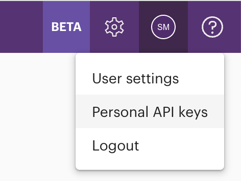
If you do not see the option "Personal API keys", your account does not have access to this feature.
3. Click "New key", give it a name, and submit.
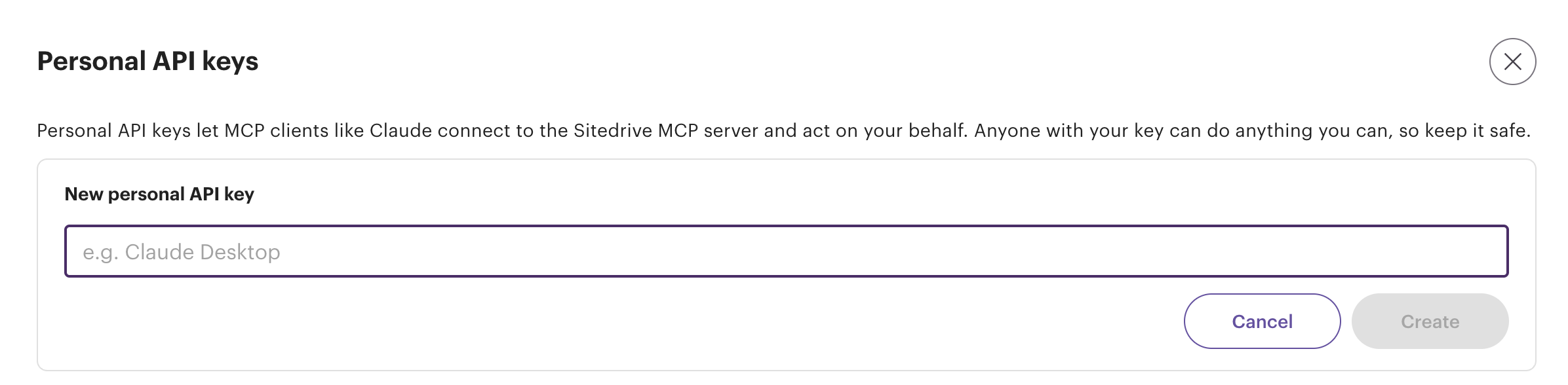
4. Copy the token immediately - you will only see it once.
Note that PATs are scoped to MCP only; they grant access to the operations exposed as MCP tools and nothing else. They cannot be used to call the regular Sitedrive API or sign in to the UI. Revoke tokens you no longer use.
You can read further instructions and information here.