
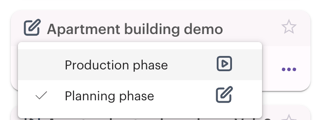
Your site is either in Planning phase or Production phase. The Planning phase is meant for creating a draft version of your schedule.
In the Planning phase, there are some limitations, such as restricted mobile use and status updates, and a limited number of users on site.
Changing the phase
1. Go to the home page.
2. Click on the pen symbol next to the name of your site.

3. Select "Production phase" from the options.
Please note that after the phase has been changed from the planning phase to the production phase, you cannot change it back yourself. If you accidentally change the phase, but you want to change it back please contact Sitedrive support at support@sitedrive.com.