
This release brings Excel export to the Gantt view, a comprehensive REST API key system for integrations, continued Location View development in beta, and significant mobile app improvements.
What's New
Excel Export for Gantt View
You can now export your Gantt view to Excel directly from the schedule. The export includes all visible columns, hierarchy structure with numbered work package levels, area breakdowns, and custom fields. Access it from the import/export dropdown menu in the toolbar.

REST API & Integrations
API Key Management
The new API key system is now fully operational:
- Create and manage API keys from the Admin settings
- Granular, site-scoped access — API users only see sites and projects they have permissions for
- Per-key rate limiting (15 requests per 5 seconds) and brute-force protection
- Full OpenAPI/Swagger documentation at
/api - Supported endpoints: sites, projects, users, work sections, and operations
Task Status Update Endpoint
External systems (e.g., quality management software) can now programmatically update task completion status in Sitedrive:
PUT /api/v1/projects/{project_id}/tasks/status- Set progress percentage (0–100) which automatically derives status (Planned/In Progress/Completed)
- Supports targeting specific work areas
New Endpoints:
GET /api/v1/sites/{site_id}/users— list users with access to a siteGET /api/v1/projects/{project_id}/operations— list project operations
Mobile App
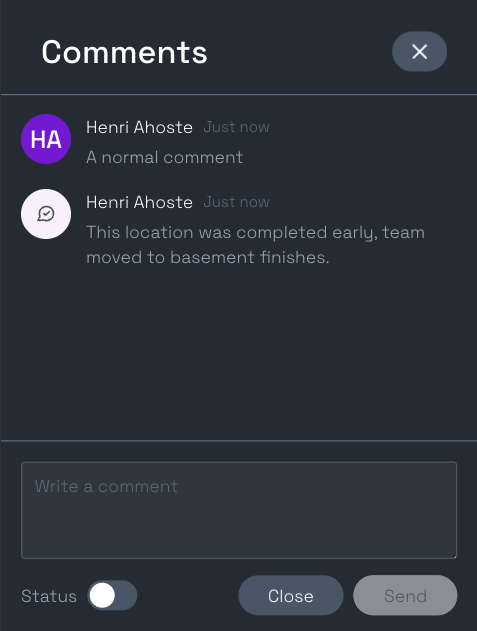
- Status Comments: You can now view and add status comments directly from the mobile app. Activate the "Status" switch to send a status comment.
- Performance: Significant parsing and data processing optimizations — eliminated unnecessary data serialization and moved to just-in-time data access patterns.
Bug Fixes
- Operation Log Icons: REST API operations now display a terminal icon, and mobile operations correctly show the mobile icon in the legacy client.
Schedule View Renewal (Beta)
Beta testing continues with select customers. This release adds the foundational Location View — a new way to plan and manage work across physical locations.
Location View
A new dedicated view for location-based planning:
- Automatic Setup: Entering Location View for the first time automatically creates a location breakdown from your space model — no manual configuration needed.
- Phase Selection: Click any work package suggestion or instance to select its phase. When selecting a phase with unassigned areas, the Define Areas drawer opens automatically.
- Phase Bar Drag: Drag the phase bar to move all task instances belonging to a phase at once, with snap-to-slot behavior and real-time visual feedback. Supports edge scrolling and ESC to cancel.
- Live Preview: Toggling areas in the Define Areas drawer shows a real-time preview of timing changes on the timeline before saving.
Additional Beta Improvements
- Space Model Builder: Added loading state during space model creation with a success dialog offering direct navigation to Location View.
- Performance: Data parsing optimized, significantly improving schedule load times.
- Work Package Ordering: Drag-to-reorder now correctly persists order after page reload in the beta schedule.
- Dependency Lines on Sum Rows: Dependencies involving sum rows are now always visible as dotted lines, instead of being hidden when rows were collapsed.
- Finnish Keyboard Support: Fixed a crash when using dead keys or IME input (e.g., typing ä, ö, å on Finnish keyboards) in table cells.
- Space Model Self-Reference: Fixed "Cannot copy work packages from itself" error when a copy-source space is moved under its copy-target during tree restructuring.
- Disappearing Work Packages: Fixed an issue where adding a work package above or below a root sum WP would cause the new row to vanish after schedule updates.
Interested in Joining the Beta?
Reach out to your Sitedrive contact or email us at support@sitedrive.com.